# Prop Setup

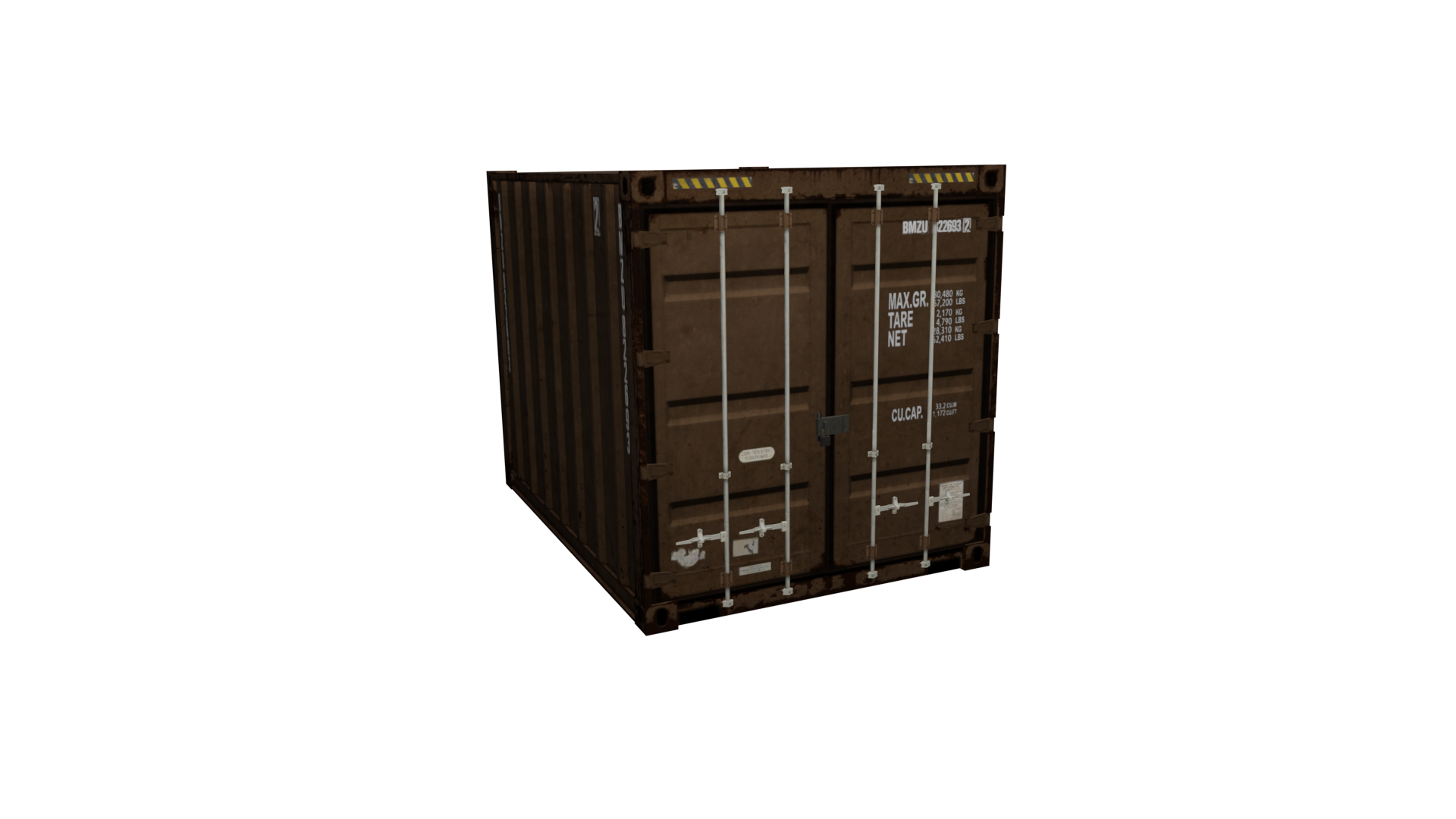
The example prop used in this article is `prop_container_05a.yft`

<div align="center"><figure><img src="https://content.gitbook.com/content/hGcNKRMetkzIyWw4fER5/blobs/vtEbprRVVKtFeqBxYYGi/container.png" alt=""><figcaption><p>prop_container_05a.yft</p></figcaption></figure></div>

### Fragment Hierarchy

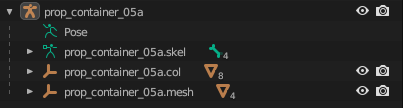
<div align="left"><figure><img src="https://content.gitbook.com/content/hGcNKRMetkzIyWw4fER5/blobs/qtKmSSGPuWicNdT4sFpj/image.png" alt=""><figcaption><p>prop_container_05a Blender hierarchy</p></figcaption></figure></div>

### Prop Rigging

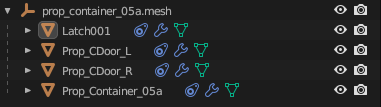
You'll also notice that each Drawable Model is rigged using a Child Of constraint instead of vertex groups.

<div align="left"><figure><img src="https://content.gitbook.com/content/hGcNKRMetkzIyWw4fER5/blobs/15LomR5T8pnRj9TU4JhE/image.png" alt=""><figcaption><p>prop_container_05a.mesh</p></figcaption></figure></div>

This is the case for all props. Typically each Drawable Model for a prop corresponds to a particular separable part of the Fragment. Notice there is a Drawable Model for the latch, each door, and the container itself.

### Skeleton Setup

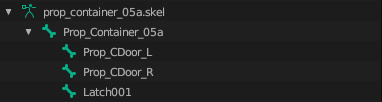
This matches up with the bone hierarchy.

<div align="left"><figure><img src="https://content.gitbook.com/content/hGcNKRMetkzIyWw4fER5/blobs/5Urnud3sKDPrWb7mFZsn/image.png" alt=""><figcaption><p>prop_container_05a.skel</p></figcaption></figure></div>

Each bone is parented to `Prop_Container_05a` and is thus affected by that bone. Every skeleton in the game engine always has one root bone that all the other bones are parented to.

{% hint style="warning" %}
If you attempt to add multiple top-level bones (bones with no parent) you will run into issues. Make sure there is a single "root" bone that all other bones are parented to!
{% endhint %}

Notice, too, that each bone has `Use Physics` enabled. This means that each of those parts will have physics in-game and will separate from each other.&#x20;

<div align="left"><figure><img src="https://content.gitbook.com/content/hGcNKRMetkzIyWw4fER5/blobs/YYcBFUHOkclBUb0kddRl/FiveM_b2944_GTAProcess_MSwcZ3DRUE.gif" alt=""><figcaption></figcaption></figure></div>

{% hint style="info" %}
In this case, the doors don't actually "separate" from the mesh, but fling open instead. This is because the `Strength` bone physics property is set to -1. When set to another value (i.e. 100) you'll notice that the parts will separate.
{% endhint %}

<div align="left"><figure><img src="https://content.gitbook.com/content/hGcNKRMetkzIyWw4fER5/blobs/ipaCzJPicgeEVgByHbUX/FiveM_b2944_GTAProcess_tiAgH2YNzr.gif" alt=""><figcaption><p>With Strength set to 100 for both doors</p></figcaption></figure></div>

### Collisions

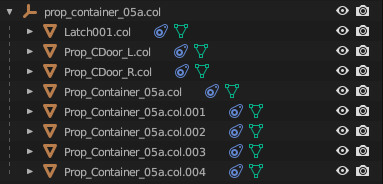
As mentioned before, each bone with physics enabled must have an associated collision. However, there can be multiple collisions for a single bone. Notice for this prop, there is a single collision for the latch and the doors, but the container itself is comprised of 5 box collisions.

<div align="left"><figure><img src="https://content.gitbook.com/content/hGcNKRMetkzIyWw4fER5/blobs/aWEdabGnCGwD2tt9QuVC/image.png" alt=""><figcaption><p>prop_container_05a.col</p></figcaption></figure></div>

{% hint style="info" %}
You will notice that a lot of vanilla collisions will use bound shapes wherever possible. This is typically preferred over using a bound mesh as it is much more performant. **Keep collisions as simple as possible.**
{% endhint %}

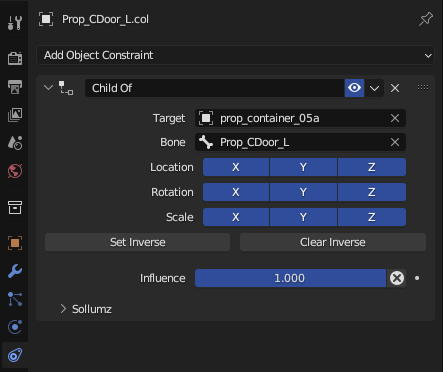
Each of these collision objects is linked to a bone via a Child Of Constraint.

<div align="left"><figure><img src="https://content.gitbook.com/content/hGcNKRMetkzIyWw4fER5/blobs/i4fyYBFuhwR3knjOcHNz/image.png" alt=""><figcaption><p>Prop_CDoor_L.col constraints panel</p></figcaption></figure></div>

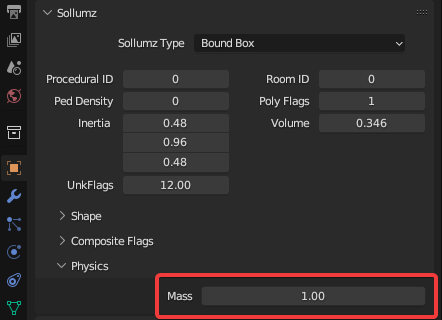
Each collision also has its mass set in the `Object Properties > Sollumz > Physics` panel.

<div align="left"><figure><img src="https://content.gitbook.com/content/hGcNKRMetkzIyWw4fER5/blobs/x56WA1q1B0sASDVHWsfC/image.png" alt=""><figcaption><p>Object Properties > Sollumz > Physics</p></figcaption></figure></div>

### Quick Note on YTYP Flags

{% hint style="info" %}
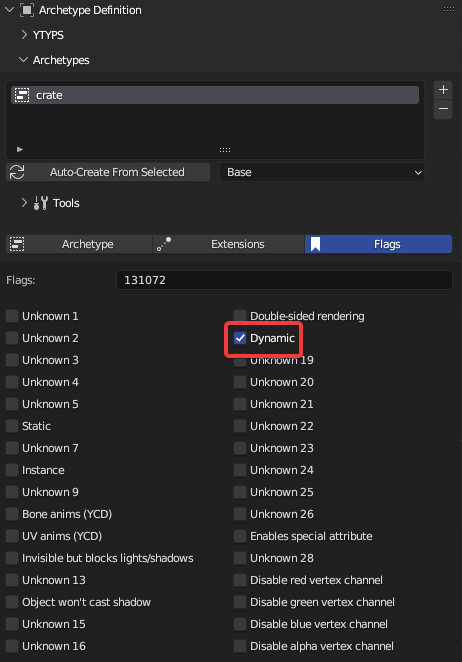
In order for physics to work for your prop in-game, make sure the YTYP archetype has the "Dynamic" flag enabled!
{% endhint %}

<div align="left"><figure><img src="https://content.gitbook.com/content/hGcNKRMetkzIyWw4fER5/blobs/Il3eC621K9gLNw9FuwZQ/image.png" alt=""><figcaption><p>Archetype Definition > Archetypes > crate > Flags</p></figcaption></figure></div>